Quick Settings menu
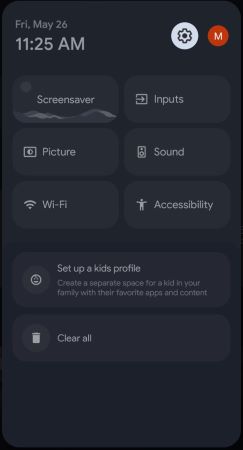
To open the Quick Settings menu, press the XXX.GHM (Home) button on the remote control to open the Home screen, then press the XXX.GST (Quick Settings) button.
The Quick Settings menu provides convenient access to frequently used features:
[All settings] – Select the cogwheel icon in the top-right corner to open the full Settings menu.
[Profile] – Opens the profile menu. From here, you can switch accounts, add profiles or remove profiles.
[Screensaver] – Activates the preset screensaver.
[Inputs] – Opens the list of inputs. You can switch to another input from this list.
[Display] – Opens settings related to the TV picture, such as brightness, contrast and picture mode.
[Sound] – Opens sound settings, such as sound style, bass and treble.
[Wi-Fi] – Opens settings for wireless and wired network connections.
[Google Home] – Allows you to control compatible Google Home devices from your TV screen without using your phone. At least two compatible devices must be available in your Google Home environment.
[Bluetooth] – Opens the menu where you can enable or disable Bluetooth and pair new accessories.
[Sleep Timer] – Allows you to set a time after which the TV will automatically switch off.
[Accessibility] – Provides access to features for users with hearing or visual impairments.
[Notifications] – Displays notifications at the bottom of the Quick Settings menu.
Note:
•The available items in the Quick Settings menu depend on your TV settings and software version.
•The Quick Settings menu may contain more than one page. When an item in the right column is selected, press the right arrow button to display the next page of Quick Settings.